
When our users visit a charging location, they check in when they charge. Check ins are the basis of what makes PlugShare the leading community-based source for finding charging locations. You can find more information on just how important check ins are to your experience, to our platform, and to our community here: The importance of Check ins
Important Note:If you're experiencing issues with a specific charger, you should contact the charging location directly for support.
While we do our best at Swap to support our community whenever possible, Swap is not able to control or assist with issues at specific charging locations. Please be sure to leave a Check in whenever you have a negative experience, and feel free to leave edits or report details on the location's listing whenever possible. This is the best way for our community to stay informed of location issues before their next visit!
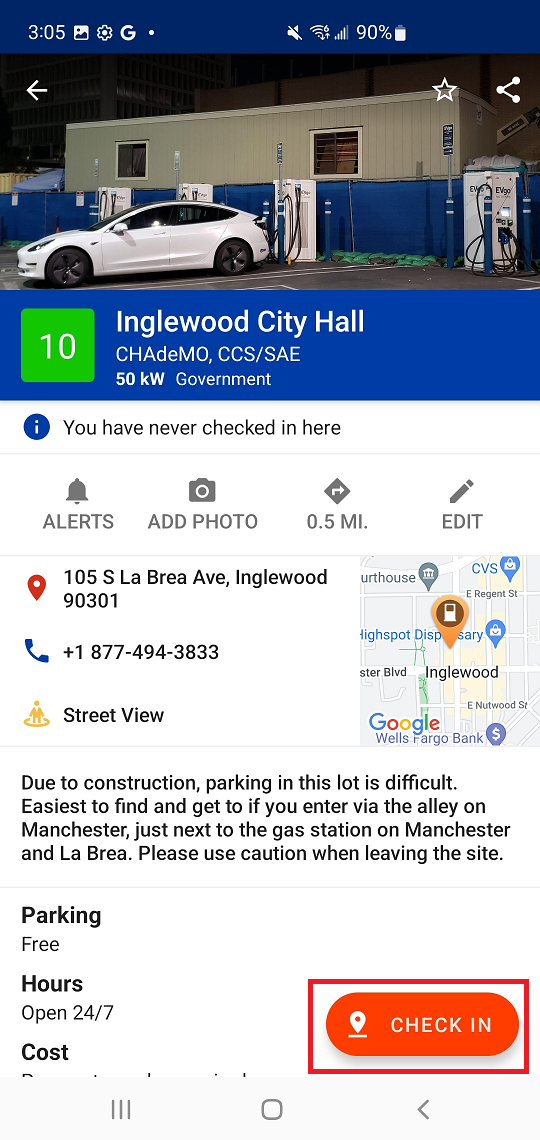
Check in with Android
- Tap the Station Summary icon on the PlugShare map to open the full Station Details window
- Tap the floating orange "Check In" button located at the bottom of the screen
- Select the check in option that best describes your experience at the location
- Confirm or provide any relevant details about your experience as prompted
- Enter an optional Comment to provide information to the location owner or other PlugShare users
- Tap "Submit" on the top right of your screen to save your check in
Check in with iOS (Apple)
- Tap the Station Summary icon on the map to open the full Station Details window
- Tap the blue "Check In" button under the general location details
- Select the check in option which best describes your experience at the location
- Confirm or provide any relevant details about your experience as prompted
- Enter an optional Comment to provide information to the location owner or other PlugShare users
- Tap "Submit" on the top right of your screen to save your check in
Comments
0 comments
Please sign in to leave a comment.